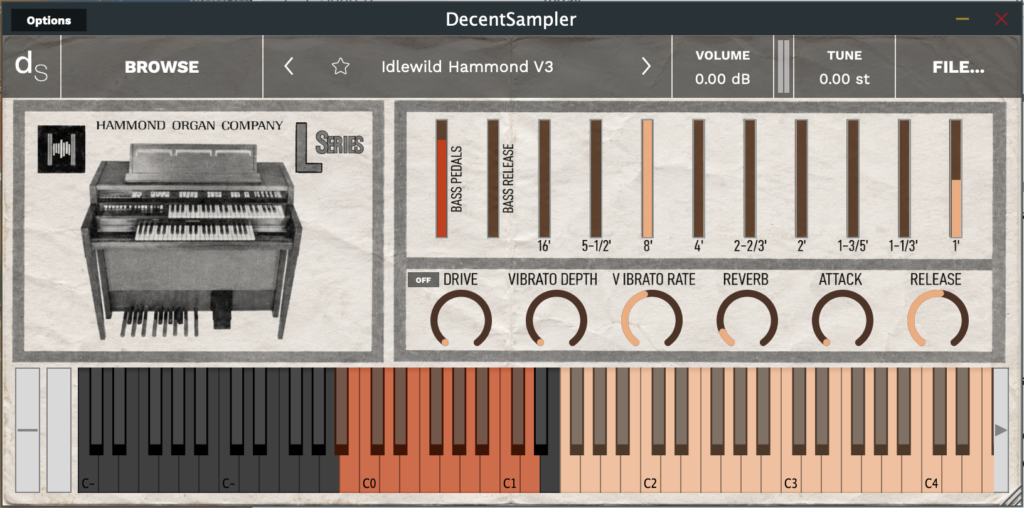
It runs in the Decent Sampler app, which you can download here:
Decent Sampler Plugin [FREE] by Decent Samples
I made this by sampling the Hammond L100 tone wheel Organ that I grew up playing since I was a teenager. To make this instrument I sampled each and every tonewheel by miking the organ’s speakers. This means that the tone imparted by the output amp, speakers and cabinet are part of the sound. I miked the two speakers in stereo, so there is a slight built-in stereo effect. If you want mono, just use the left or right channel.
I also took an impulse of the spring reverb to use with Decent Sampler’s built in convolution reverb, so the tonality of the original Hammond spring reverb is maintained.
Drawbars
These controls are fairly straightforward. The drawbars control the volume of each stop. Rather than having discreet steps, each drawbar works more like a volume slider. The colour of these drawbars correspond to the colour of the key track below.
Bass Pedals
The first two drawbars are for the bass pedals: the first for pedal volume and the second for pedal release. The output of the bass pedals is not routed to the reverb or the vibrato.
Controls
from left to right
There is a high pass filter with a number of selectable frequencies that is especially useful for tone shaping when using the DRIVE knob.
DRIVE: from clean to heavy distortion.
VIBRATO DEPTH: the amount of vibrato. This vibrato is a combination of a tremolo effect and a subtle pitch shifting effect.
VIBRATO RATE: the speed of the vibrato modulation
REVERB: the amount of spring reverb, from 0 to 100% reverb
ATTACK: only affects the main drawbars and not the bass pedals
RELEASE: only affects the main drawbars and not the bass pedals. NOTE: If you experience clicks with high release settings, turn up your max polyphony on your Decent sampler Engine settings (FILE/Preferences/Engine)